
Hair is the single biggest identity signal in Roblox UGC. Players scroll past hundreds of accessories on the marketplace and stop on the silhouette — the chunky anime fringe, the impossible spike, the warrior topknot. Meshlox's Roblox hair generator is tuned for exactly that: bold low-poly silhouettes with clean attachment geometry that drops onto the standard Roblox HairAttachment point.
You don't need Blender. You don't need to rig anything. You describe the haircut, pick a concept, generate the mesh, and send it to Roblox Studio through the Meshlox plugin. Most creators land a publishable hairstyle in 3–5 iterations.
Hair styles Roblox players actually search for
Roblox hair sales skew heavily anime and fantasy. The categories that consistently move on the UGC marketplace: spiky anime cuts (shonen-style, bold colors, defined planes), long flowing fantasy hair (elven, royal, idol), ninja-style topknots with headbands, side-swept emo fringes, and stylized twin-tails. The common thread is silhouette clarity — Roblox renders at low resolution across millions of devices, so hair that reads from a distance wins.
Skip realism. A photorealistic strand-by-strand hairstyle looks worse on a Roblox avatar than a confident 8-plane stylized cut. Meshlox's defaults bias toward the chunky low-poly aesthetic Roblox players expect, but you can push harder by including "stylized anime hair planes" and "bold color palette" in every prompt.
Roblox hair technical specs
Roblox's UGC accessory review enforces a 4,000-triangle budget, a single-mesh constraint, and correct attachment alignment. Meshlox handles all three automatically. Hair generations target 1,800–3,000 triangles, ship as a single combined mesh with baked texture, and pivot at the avatar's HairAttachment so the Roblox Studio plugin parents it correctly on first import.
Texture is a single 1024×1024 baked PNG with stylized shading already burned in — Roblox's lighting engine adds the rest. If you need a different color, re-prompt the texture pass without regenerating the mesh; it costs a fraction of a full generation.
Prompt examples for Roblox hair
Every example follows the same Roblox-friendly pattern: subject + style anchor + material + low-poly Roblox aesthetic + isolated background.
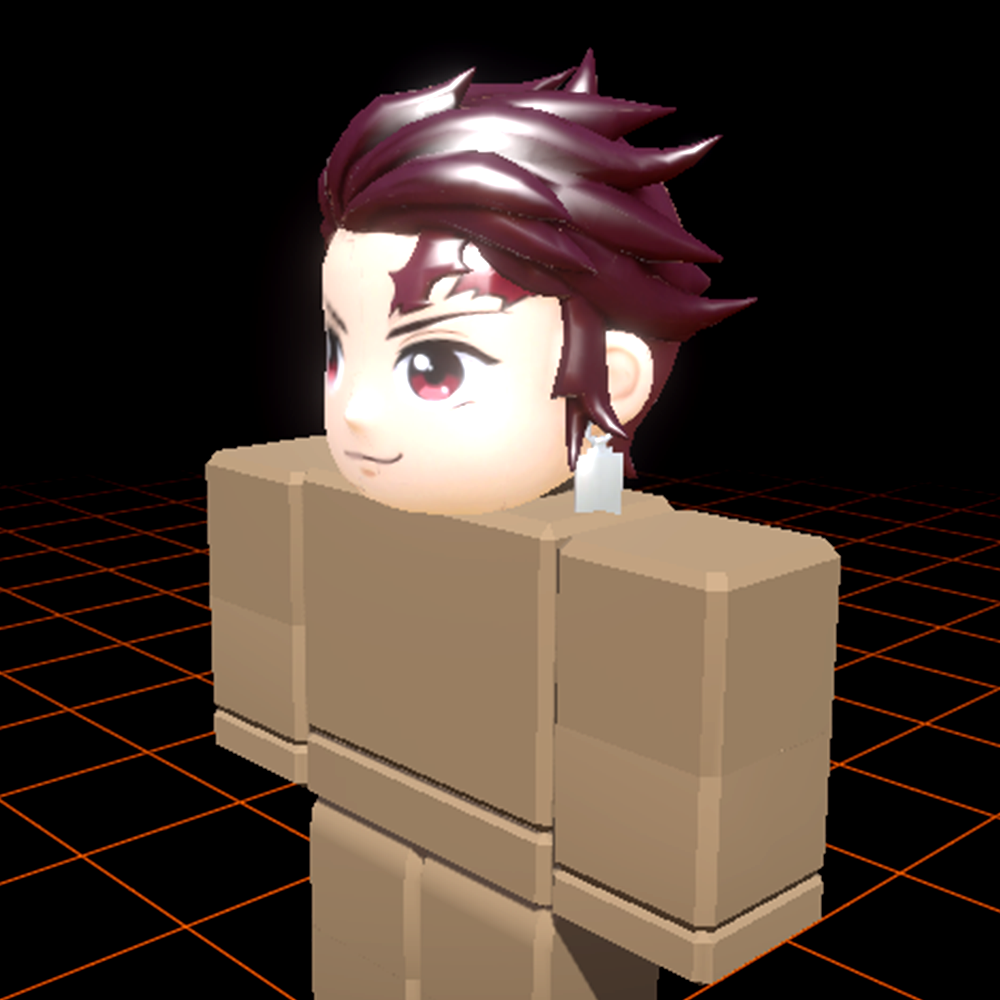
Crimson anime spikes
"Roblox UGC hair accessory, spiky anime hairstyle, deep crimson with black streaks, stylized chunky planes, anime aesthetic, low-poly Roblox style, isolated background."
Ninja topknot
"Roblox UGC hair, ninja topknot with red headband, jet black hair, stylized warrior aesthetic, chunky low-poly geometry, isolated background."
Elven flowing hair
"Roblox UGC hair, long flowing silver elven hair, soft braids on each side, stylized fantasy aesthetic, clean low-poly Roblox geometry, isolated background."
Idol twin-tails
"Roblox UGC hair, high twin-tails with pink-to-purple gradient, idol anime aesthetic, chunky stylized planes, low-poly Roblox style, isolated background."
Popular hair styles
These are the hair styles Roblox players search for most. Dedicated style pages are rolling out — for now, use these prompt seeds inside Meshlox Studio to generate them on demand.
Anime hair
Spiky, side-swept, chunky planes — anime silhouettes.
Generate in Studio
Spiky hair
Bold pointed silhouettes for action and combat avatars.
Generate in Studio
Ninja hair
Topknots, headbands, low-tied warrior cuts.
Generate in Studio
Long flowing hair
Fantasy elf, idol and royal long hair styles.
Generate in Studio
Ponytail hair
High, low and side ponytails with stylized fall.
Generate in Studio
Fantasy hair
Elven, demonic and mythic-themed hair.
Generate in Studio